How Can Small Singapore Workspaces Be Made More Ergonomic With The Right Furniture?
Small Singapore workspaces can be made more ergonomic by selecting slim-profile furniture with built-in adjustments, clearing floor clutter to preserve legroom, and arranging your layout to avoid cramped sitting. Combining space-saving features like flip-up armrests with adjustable lumbar support ensures complete physical support without overcrowding tight rooms.
Key Takeaways
- Prioritize Adjustability Over Size: Slim chairs with adjustable lumbar support and flip-up armrests deliver full ergonomic protection without taking up extra space.
- Protect Your Legroom: Offloading storage to wall shelves and cable trays prevents cramped leg positioning that strains your lower spine.
- Optimize Room Layout: Proper chair clearance and desk placement prevent hunched sitting and reduce neck strain caused by bad screen angles.
- Avoid Space-Saving Shortcuts: Replacing proper seating with backless stools causes back fatigue and long-term posture issues.
Singapore’s home offices and compact workspaces come with a built-in challenge: limited floor space. As a result, proper body support is often sacrificed just to fit furniture into a tight room.
However, compact furniture does not have to mean poor physical support. Selecting the right setup allows you to maximize limited floor space while protecting your spine during long work hours.
In this blog, we will walk you through practical furniture choices and layout adjustments to make even the smallest Singapore workspace ergonomic.
The Space-Ergonomics Trade-Off
Fitting an office into a compact room often forces tough choices between floor space and body comfort. However, downsizing your furniture footprint does not mean you have to sacrifice daily spinal support.
Why Compact Does Not Mean Unsupportive
Many people assume that small chairs lack proper ergonomic features. Choosing slim furniture with built-in adjustments gives you full physical support without crowding your room.
- Reduces room clutter: Compact frames leave more walkable floor space in tight rooms.
- Protects body alignment: Essential support features keep your spine in its natural curve.
- Fits narrow desks: Smaller bases slide cleanly under compact work surfaces.
The Risk of Sacrificing Support for Size
Picking a non-ergonomic stool or fold-out chair just to save space creates long-term health risks. Sacrificing adjustability leads to daily strain that accumulates over time.
- Causes back fatigue: Lack of lumbar support forces muscles to work harder all day.
- Restricts healthy sitting: Fixed seats prevent you from adjusting height and tilt properly.
- Increases neck strain: Improper seating heights force you to look at screens at bad angles.
What to Prioritize in Tight Spaces
Not every ergonomic feature needs a large chair or a sprawling desk setup. A few priorities matter most in compact rooms.
- Chairs with a slim profile but full lumbar adjustability
- Desks with adjustable height, so posture stays correct even in tight corners
- Armrests that fold or retract when space is at a premium
- Wheels and swivel base for easy movement in narrow layouts
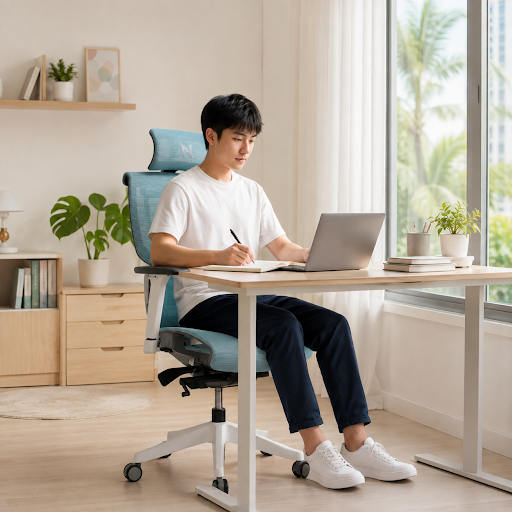
A good office chair in Singapore homes or offices doesn’t need to be bulky to do its job well.
Layout Considerations That Matter
Furniture choice is only half the equation. How it’s arranged in a small room affects posture just as much.
| Layout Factor | Ergonomic Impact |
| Desk against a wall | Frees floor space, keeps screen distance consistent |
| Chair clearance behind desk | Prevents cramped, hunched sitting |
| Natural light direction | Reduces neck strain from screen glare |
Table: Layout Factors and Their Ergonomic Impact
Even a well-designed office desk chair in an ergonomic build loses its benefit if the room layout forces awkward angles.
Smart Storage Solutions That Protect Your Legroom
Clutter on the floor reduces the physical space your body needs to sit comfortably. Keeping your desk area organized directly protects your legs and lower back from awkward positions.
How Floor Clutter Hurts Your Posture
Storing boxes or computer towers under your desk limits where you can place your feet. This forces your lower body into cramped, twisting positions that strain your spine.
- Forces bent knees: Packed floor space prevents your legs from extending naturally.
- Triggers hip strain: Sitting at an angle to avoid clutter twists your lower spine.
- Blocks movement: Stuffed legroom keeps you from shifting positions during the day.
Space-Saving Storage Ideas
Moving your office storage off the floor frees up crucial legroom under your desk. Using vertical space keeps your daily tools nearby while keeping your sitting area open.
- Mount wall shelves: Place books and files above your screen to keep floor areas clear.
- Use slim desk drawers: Store small accessories in compact drawers under the desktop.
- Attach cable trays: Hang power strips and cords under the desk to prevent tangled wires underfoot.
How to Choose a Space-Saving Chair Without Sacrificing Spine Support
Finding a good office chair in Singapore for a small room requires balancing a slim physical profile with core ergonomic features. You can easily keep your floor space open while giving your spine complete support.
Essential Design Features to Look For
- Slim backrest frame: Provides full spinal support without adding bulky padding.
- Narrow star base: Takes up less floor area while keeping the chair completely stable.
- Flip-up armrests: Fold up easily so the seat slides fully under your desk when not in use.
- Built-in lumbar adjustment: Fits your lower back curve without adding extra depth.
How to Test a Compact Chair Before Buying
- Check the seat depth: Make sure two fingers fit between the seat edge and your knees.
- Test the swivel: Ensure the chair rotates smoothly without hitting nearby walls or furniture.
- Verify desk clearance: Measure the seat height to ensure your legs slide under your desk comfortably.
These simple yet effective factors help in determining whether the right office desk chair in ergonomic design ticks all the boxes.
Common Mistakes in Small Setups
Space pressure often leads to shortcuts that quietly undermine posture over time.
- Choosing a stool or backless seat to save space
- Placing the desk too close to a wall, forcing a hunched reach
- Skipping footrests when the desk height doesn’t match the chair
These shortcuts feel harmless at first. Over weeks of daily use, they add strain that a slightly better furniture choice would have avoided.
A Few Practical Adjustments
Even without buying new furniture, small changes help immediately.
- Angle the chair so knees clear the desk edge
- Keep the monitor at eye level using a stand or stacked books
- Leave at least an arm’s length of clearance behind the chair for movement
These adjustments cost nothing and can noticeably improve daily comfort in a tight room.
Final Thoughts
Maximizing a small workspace is fully achievable without compromising your physical health. Prioritizing adjustable, space-efficient furniture and maintaining an open floor layout allows you to maintain optimal spinal alignment throughout the workday.
Take control of your daily sitting environment. Make these simple setup adjustments before choosing an office desk chair in ergonomic design. You will protect your spine from daily strain. You will also build a foundation for long-term comfort and health.
Ready to Rethink Your Setup?
Check your current room layout and chair footprint. Upgrading to a slim, fully adjustable ergonomic office chair will maximize your floor space while keeping your spine perfectly supported.